Every window
in its place.

HyperTile tiles your Mac's windows automatically. Open an app and it gets its own space on screen. Close one, and the rest fill the gap.

One-time purchase · Up to 3 Macs · 7-day refund · macOS 14 Sonoma or later

Without HyperTile

The problem

You didn't buy a Mac to arrange windows.

A browser for research, an editor for the work, chat, mail, a calendar. A few minutes in, they're stacked on top of each other and the one you need is always underneath.

So you drag a corner, nudge an edge, and squint at a sliver of a window to guess which one it is. Then you do it again after lunch.
How it works

Open a window. It finds its place.

  1. Open a window.

    It fills the screen. There's nothing to drag and nothing to resize.

  2. Open another.

    The screen splits evenly, with a clean gap between the two.

  3. And a third.

    It takes its own tile. The others move over to make room.

  4. Four fit perfectly.

    Every window is visible. Nothing overlaps, nothing hides behind anything else.

  5. Close one.

    The rest close the gap, so your screen is never half empty or half buried.

Layouts

Four layouts, one shortcut each.

Choose how windows share your screen. Switch any time and everything moves into place.

Equal tiles, two by two. ⌃⌥⌘1

Side by side, full height. ⌃⌥⌘2

Stacked, full width. Ideal on portrait displays. ⌃⌥⌘3

One main window with the rest beside it. ⌃⌥⌘4

Virtual desktops

More room when you need it.

Turn on HyperTile's virtual desktops and each display gets as many as you like, every one of them tiled. Switch with⌃⌥1 to 9, or swipe with four fingers on the trackpad.

When a screen is full, new windows can open on the next desktop and take you with them. It's off until you turn it on.

Keyboard

Rearrange without reaching for the mouse.

Try it here: click the keys, or hold ⌃⌥ and press the arrow keys.

Swap windows

⌃⌥ arrows

Move focus

⌃⌥⌘ arrows

Make main

⌃⌥⌘↩

Focus mode

⌃⌥⌘F

Details

Built for the way you actually work.

Made for macOS

Feels like part of your Mac.

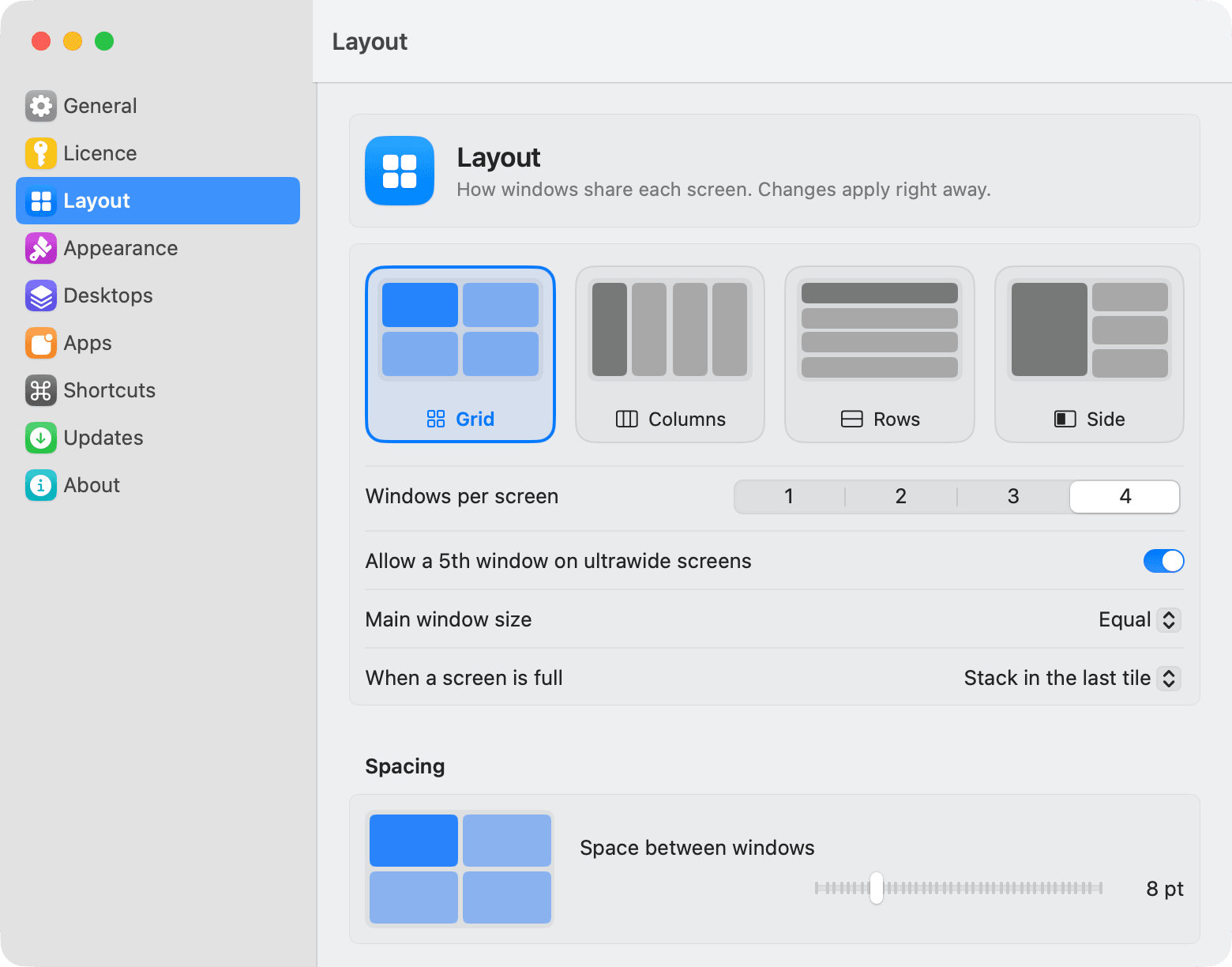
HyperTile lives in the menu bar. Its settings look and work like System Settings, a short welcome tour gets you set up in about a minute, and every change applies the moment you make it.

HyperTile's Layout settings: Grid, Columns, Rows and Side layouts, windows per screen, main window size and spacing.

Pricing

Pay once. Keep it.

$15

One-time purchase

Buy HyperTile

Secure checkout by Polar. Your licence key arrives by email.

  • Every feature
  • Up to 3 Macs per licence
  • All future updates
  • Full refund within 7 days
  • macOS 14 Sonoma or later, Apple silicon and Intel

There's no free trial. If HyperTile isn't right for you, email us within 7 days for a full refund.Already bought it? Download and activate.

Questions

What is HyperTile?

HyperTile is a menu bar app for macOS that tiles your windows automatically. Every window you open gets its own tile on the screen, and the others make room, so you never drag or resize windows by hand.

How is HyperTile different from the window tiling built into macOS?

Since macOS Sequoia you can drag a window to a screen edge, or use a shortcut, to put it in a half or a quarter. You still place every window yourself. HyperTile does it for you: windows are tiled as they open and close, with four layouts, gaps you choose, virtual desktops and keyboard control.

How much does HyperTile cost?

$15, paid once. That covers up to 3 Macs and every future update. There is no subscription.

Is there a free trial?

No. Instead, you get a full refund within 7 days of buying if HyperTile isn't for you. Just email us with your order details.

Which Macs and macOS versions does HyperTile support?

macOS 14 Sonoma or later, on Apple silicon and Intel Macs. It's a native app, written in Swift.

Why does HyperTile need Accessibility access?

macOS only lets an app move and resize other apps' windows through the Accessibility permission. HyperTile uses it for exactly that. It doesn't read what's inside your windows, log your keystrokes or record your screen.

Does HyperTile collect any data?

No analytics and no tracking. The only network traffic is checking for updates and activating your licence key with Polar, our payment provider, which receives the key and your Mac's model name.

Does it work with multiple displays and ultrawide monitors?

Yes. Each display is tiled on its own, you can drag a window to another display to move it there, and ultrawide screens can hold a fifth window.

What are HyperTile's virtual desktops?

Optional extra desktops for each display, separate from macOS Spaces. Switch with Control-Option-1 to 9, or swipe with four fingers on the trackpad. Windows that don't fit on a full screen can move to the next desktop by themselves.

What happens with apps whose windows can't be resized, or that need a minimum size?

HyperTile learns each window's size limits and lays out the other tiles around them. Fixed-size windows are centred in their tile. You can also leave any app out of tiling, or float a single window.

Can I get a refund?

Yes, a full refund within 7 days of your purchase, no questions asked. Email us with the address you bought with.

Give every window a place.

7-day refund · Up to 3 Macs · Every update included